
1. Open tt
This step opens tt with made-up accounts and messages, so you can try every key without a mail account.
Before you start
Section titled “Before you start”You need tt installed. On Debian and Ubuntu, follow Install on Debian and Ubuntu. To use your own accounts later, First run writes a real config.toml. This tutorial does not need one yet.
Make an empty configuration
Section titled “Make an empty configuration”tt stops when it finds no config.toml. An empty file is enough:
mkdir -p ~/.config/tildetouch ~/.config/tilde/config.tomlIf the file already exists, touch leaves its text as it is.
Open tt
Section titled “Open tt”tt --demo--demo shows made-up accounts and messages instead of the accounts of config.toml. They are the same on every run. The first start also writes init.lua and keybind.lua in ~/.config/tilde/scripts. keybind.lua holds every key that this tutorial uses.
Checkpoint
Section titled “Checkpoint”You should see one screen with three parts:
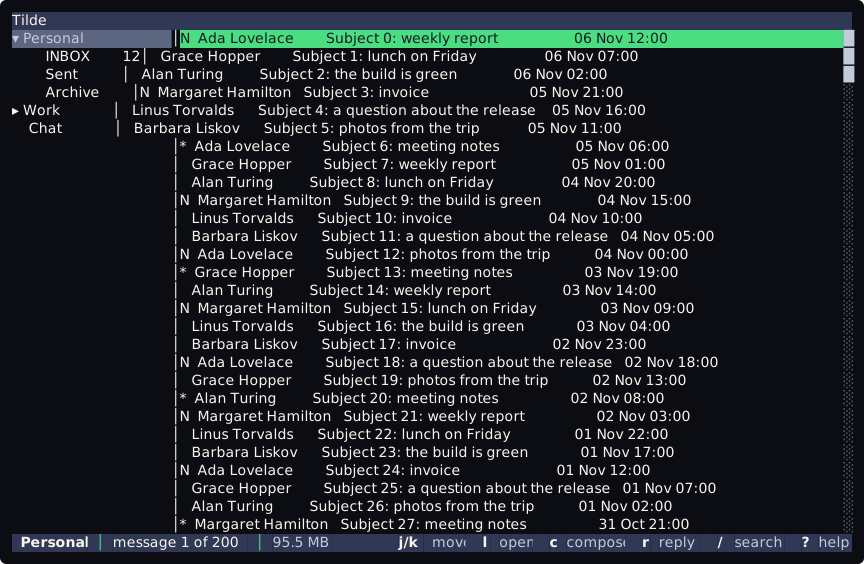
Tilde▾ Personal │N Ada Lovelace Subject 0: weekly report INBOX 12│ Grace Hopper Subject 1: lunch on Friday Sent │ Alan Turing Subject 2: the build is green Archive │N Margaret Hamilton Subject 3: invoice▸ Work │ Linus Torvalds Subject 4: a question about the release Chat │ Barbara Liskov Subject 5: photos from the tripPersonal │ message 1 of 200 │ 95.4 MB j/k move l open c compose r reply / search ? help- On the left, the tree of the accounts.
Personalis open and shows its folders.INBOX 12means twelve unread messages. - On the right, the list of messages, newest first, with the date at the end of each row.
Nmarks an unread message and*a flagged one. - At the bottom, the bar says where you are: the account,
message 1 of 200, the memory that Tilde uses, and the keys that work here. It is made by a script you can change, see Bars.
If you see There is no configuration file at ... instead, the file of the step above is missing. Make it and run tt --demo again.
Leave tt open. Next: 2. Move in the list.