
Themes of tt
This page shows how to change the colours of tt with a theme file. The complete table of roles is in Theme roles.
Pick a theme
Section titled “Pick a theme”A theme is a file themes/<name>.toml in the root folder of Tilde, next to config.toml (~/.config/tilde/themes/ by default, or the themes/ of the root that --config gives). Name it in the [ui] table:
[ui]theme = "dusk"A name is made of letters, digits, - and _, and starts with a letter or a digit. Without [ui] the built-in theme is used. It follows the sixteen colours of your terminal. If you write a file themes/default.toml, tt reads it like any other theme: the roles it names change, the others keep the built-in look.
Write a theme
Section titled “Write a theme”A theme has one table for each role, the name a widget gives to the cells it draws. This is themes/dusk.toml:
[roles.Bar]fg = "#fff3e0"bg = "#8a4b12"
[roles.Selected]fg = "black"bg = "#ffd166"
[roles.Cursor]reverse = true
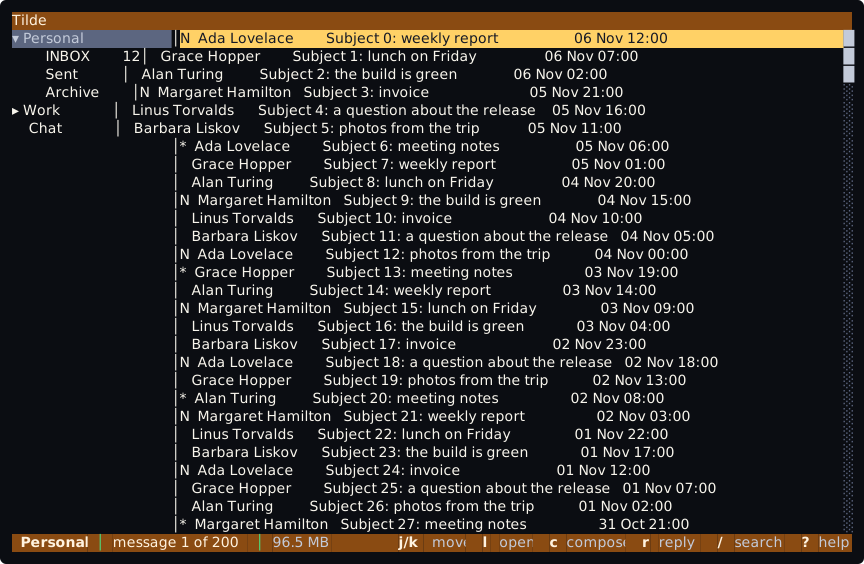
Only the roles in the file change. The others keep the look of the built-in theme. With theme = "dusk" the bars are white on the brown-orange background of Bar and the selected message is black on yellow:
| Role | What it styles |
|---|---|
Bar |
The top bar and the bottom bar. |
Selected |
The selected row of the list that has the focus. |
SelectedUnfocused |
The selected row of a list that does not have the focus. |
Placeholder |
The hint in an empty text box. |
Cursor |
The cursor of a text box. It needs reverse = true or colours, or it cannot be seen. |
ScrollTrack, ScrollThumb |
The scroll bar of a list. |
The keys of a role
Section titled “The keys of a role”| Key | Meaning |
|---|---|
fg |
The colour of the text. |
bg |
The colour behind it. |
bold |
true or false. |
reverse |
true or false: swap the two colours. |
All four are optional. A key you write replaces that key of the role in the built-in theme, and a key you leave out keeps it. So [roles.Bar] with only bold = true is the bar as it is, in bold, and bg = "default" takes the background colour off.
A colour is one of black, red, green, yellow, blue, magenta, cyan and white, with bright in front for the light ones (brightblack), a true colour #rrggbb, or default for the colour of the terminal.
When something is wrong
Section titled “When something is wrong”The names of the roles are not checked: [roles.Selcted] is accepted and changes nothing. A theme that is not there, a file that is not TOML, an unknown key in a role, a value of the wrong kind or a colour that is not valid stops tt before the screen opens, with exit code 1 and a message that says what is wrong. For a mistake in the file, the message names the file and the key:
In the theme file '/home/ada/.config/tilde/themes/dusk.toml', roles.Bar.bg 'rouge' is not a colour; use black, red, green, yellow, blue, magenta, cyan or white (with bright in front for the light ones), #rrggbb, or default.tcli check reads the [ui] table but not the theme file, so a mistake in the file shows when tt starts.