
Search
This page explains how to find a message in the list of tt with /, how to search the whole mail cache of an account with g/, and how n and N go from one match to the next.
Try it
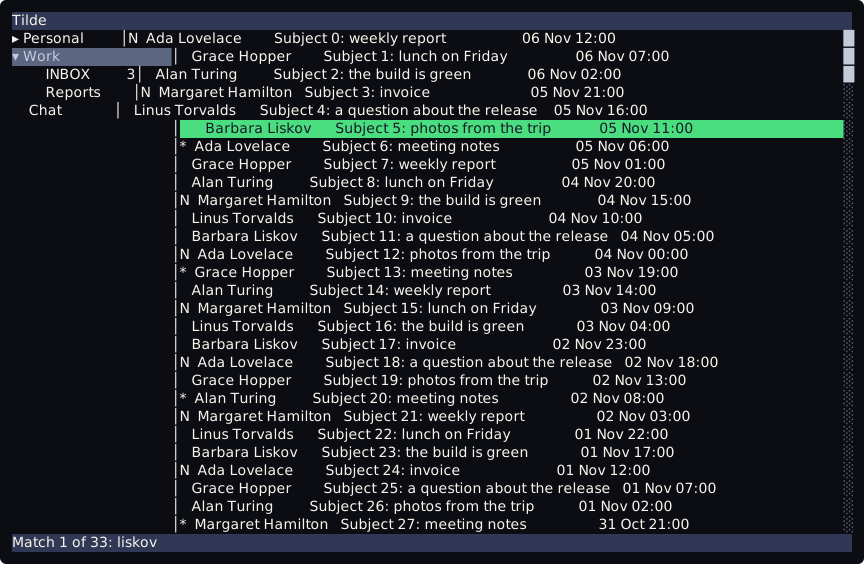
Section titled “Try it”tt --demoWith the focus on the list, type /. A line that starts with / opens at the bottom. Type liskov and press Enter. The selection goes to the first message from Barbara Liskov, and the bottom bar says Match 1 of 33: liskov. Press n for the next one and N for the previous one.
How it finds
Section titled “How it finds”- The search looks at the sender and the subject of each message that the list holds.
- It is plain text, and the case does not matter:
liskovfindsLiskov. There is no regular expression and no wildcard. Enterselects the first match after the selected message.Esccloses the line and searches nothing./and thenEnteron an empty line repeats the last search.- The line has the same editing keys as the command line.
Going on
Section titled “Going on”| Keys | What they do |
|---|---|
/ |
ask for a text and select the first match after the selected message |
n |
the next match of the last search |
N |
the previous match of the last search |
5n, 5N |
five matches on, or five back |
A count before / is ignored. A count before n or N is not.
The bottom bar
Section titled “The bottom bar”| It says | When |
|---|---|
Match 3 of 12: report |
the third of twelve matches is selected |
Match 1 of 12: report (search hit the bottom) |
n went past the last match and started again at the top |
Match 12 of 12: report (search hit the top) |
N went past the first match and started again at the bottom |
No match for 'report' |
no message of the list has the text |
No previous search |
n or N before any search |
The text stays until the next key, then the status line says message n of 200 again.
Search the mail cache
Section titled “Search the mail cache”/ looks only at the list. When the mail cache is on, g/ searches its index instead: the sender, the subject and the body of the messages, in every folder of the open account.
With the focus on the list, type g/. A line that starts with all/ opens at the bottom. Type a word and press Enter. The best hit is selected, in its own folder: the sidebar goes to that folder and the list shows it. The bottom bar says Hit 1 of 12 in Archive: Invoice for November. n and N go through the hits, from the best one on.
- The index holds what the cache has seen: the sender and the subject of every message that
ttlisted, and the body of every message that I opened. A folder that I never opened has nothing in it, and a body that I never read is not found. - Case and accents do not matter, every word must match, and every word matches as a prefix:
fattur novfindsFattura di novembre. - It keeps the 50 best hits. A blank line repeats the last search and goes to the next hit.
- The list holds the newest 1000 messages of a folder. A hit older than that opens its folder, but the selection stays where it was and the bar still names the hit.
- A hit whose folder is not in the sidebar yet (the folders of an account are read when I select it) is not opened. The bar says where it is:
Hit 2 of 12 is in 'Archive/2019', which the sidebar does not show: …. - With the cache off the bar says
The mail cache is off: set enabled = true in the [cache] section. With--demoit saysThere is no mail to search.. - A
/after it takesnandNback to the list.
What it does not search
Section titled “What it does not search”- Only the list and only the messages it holds. The tree has no search:
/in the tree does nothing. - Only the messages that are loaded: the newest 1000 of the folder. An older message is not found.
- Not the body of a message. For the body, use
g/above, ortclifrom a shell: see The cache. - The match is not highlighted in the row, and there is no backward search with
?.
The same from the command line
Section titled “The same from the command line”/ runs the command search.run with the text. It can be run from the command line or bound to a key:
:search.run "weekly report":search.cache invoicesearch.cache runs the search of the mail cache, as g/ does.
The keys are lines of keybind.lua. A keybind.lua written before the search existed has none of them. Add these lines and run tt again:
keys.bind("list", "/", "search.start")keys.bind("list", "n", "search.next")keys.bind("list", "N", "search.previous")keys.bind("list", "g/", "search.cache-start")To change one of them, see Change a key.