
Bars
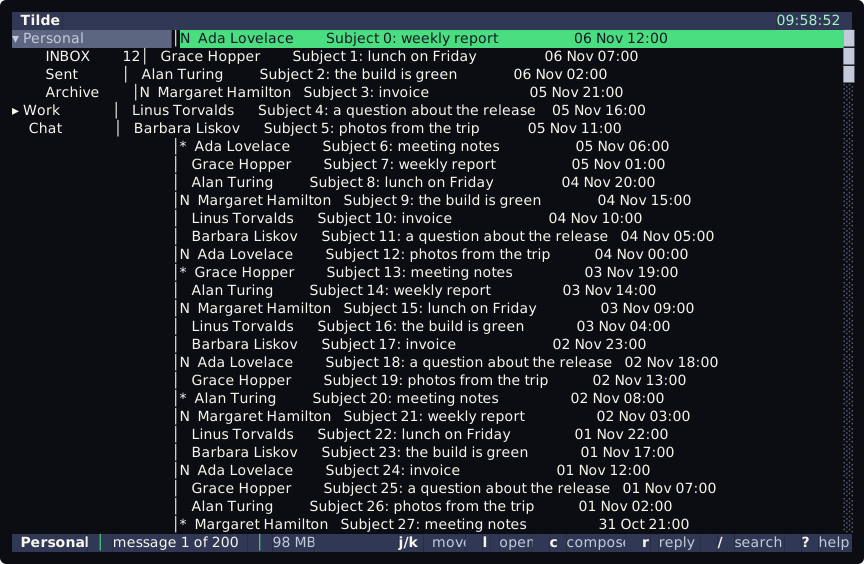
The top bar and the status line of tt are built by Lua functions. This page shows a clock in the top bar, then says how a bar is set, when it is built again and how to get the default status line back.
A first script
Section titled “A first script”Put this in init.lua (or in bars.lua, see below):
bar.interval(1)bar.top(function(ctx) return { left = { { " Tilde", bold = true } }, right = { { sys.date("HH:mm:ss") .. " ", fg = "accent" } }, }end)The top bar now shows the name at the left and the time at the right, and the time moves every second. Without bar.top the top bar shows the title of the program.
Set a bar
Section titled “Set a bar”| Function | What it does |
|---|---|
bar.top(fn) |
Sets the function of the top bar. A later call replaces it; nil removes it and brings the title back. |
bar.bottom(fn) |
Sets the function of the status line, in the same way. nil brings back the plain status (Message 3 of 120). |
bar.interval(seconds) |
Builds the bars again every seconds, from 1 to 86400, for both bars. nil stops it. |
bar.hints(ctx.keys, style) |
Turns the key hints of the screen into items. See the context. |
fn gets ctx, a copy of the state of the screen, and returns a table: left and right, two lists of items, and bg, the colour of the whole row. Both sides are optional. What an item may be is on What a bar returns; the fields of ctx are on The bar context.
sys.date(format) gives the local time as text. The format is a .NET one, such as "HH:mm:ss" or "ddd dd MMM yyyy", not the %H:%M of os.date. The names of the days and the months are always in English, whatever the language of the system. sys.memory() gives the memory that Tilde uses, such as 241.3 MB.
When a bar is built
Section titled “When a bar is built”A bar is built again when the screen changes: another folder, another message, the focus, a key, the width of the terminal, the connection of the account. With bar.interval it is also built on that interval.
- The function runs in the background, off the thread that draws, so the screen never waits for it and draws the last result. It shares the script engine with your other Lua code, one piece of work at a time, so keep it short.
- Changes that come close together make one build.
- A message of a command (
:, a search) takes the place of the status line until the next key.
The default status line
Section titled “The default status line”Tilde writes bars.lua into the scripts folder the first time it finds it missing, and never changes it. It runs after keybind.lua and before init.lua, so a bar.bottom(...) in init.lua replaces the one of bars.lua. The default status line shows the place, the counts, the position in the list, the connection, the memory and the key hints. It leaves the top bar unset. Two ways to change it:
- edit
bars.lua: it is your file, and its comments say what each part draws; - leave it alone and call
bar.bottom(...)ininit.lua.
To start again from the shipped copy, rename bars.lua and start tt: it writes a new one. Deleting it does not get rid of the default status line: tt writes it again at the next start. To have no bars of yours, empty the file, or call bar.bottom(nil) in init.lua. The file ends with the clock above, commented out. In tt, :scripting.reload runs the files again.
When a function fails
Section titled “When a function fails”A bar function only describes the bar. These calls from inside it are an error: bar.top, bar.bottom and bar.interval (each call would build the bars again and run the function again), commands.run, commands.add and commands.remove (a command that changes the screen builds the bars, and so runs the function again), timers.after and timers.every, jobs.enqueue and jobs.every, events.on (it would add a handler at every build), ui.theme (it redraws the screen) and keys.bind and keys.unbind (the bar shows the keys, so the function would change what it is describing). Do them from bars.lua, init.lua, a timer, a job, an event handler or a command. A timer that you start outside the function and that sets a bar again is not stopped: do not write that.
A function that fails, or returns something that is not valid, is reported like any script error, once. The bar keeps its last good result. If there has been no good result yet, the screen shows its own title and status, so a mistake never leaves a bar empty. While the function keeps failing it is not reported again at every build; the details are in the log.