
Keys from Lua
keys.bind binds a key to a command or to a function of yours, and keys.unbind takes a binding away. This page binds three keys in init.lua. The contexts and the notation of keys are on Change a key.
Bind a key
Section titled “Bind a key”Put this in ~/.config/tilde/scripts/init.lua:
commands.add("hello", function(args)  return "Hello, " .. (args[1] or "world")end, "Says hello.")
-- a function: a count typed before the key is the first wordkeys.bind("list", "x", function(args)  return "x pressed, count " .. (args[1] or "none")end, "Show a message")
-- the name of a commandkeys.bind("list", "<leader>h", "hello")keys.bind("global", "gh", "hello")
keys.unbind("list", "gg")tcli scriptsIn tt, press x and the bottom bar shows x pressed, count none. Press 5 and then x and it shows x pressed, count 5. Space and then h shows Hello, world. g and then h does the same wherever the focus is, and gg does nothing in the list any more.
What bind takes
Section titled “What bind takes”keys.bind(context, lhs, rhs, description):
contextisglobal, which works everywhere, or the part of the screen that has the focus:sidebar,listorreader. A key is looked up in the focused context first and then inglobal.writing(a line of text) anddialog(a window) look only in their own keys. A name has lowercase letters, digits,_and-, and starts with a letter. A name that nothing uses is not an error, so a typo gives a binding that never runs.lhsis the key or the sequence, in vim notation:j,gg,<C-d>,<Esc>,<CR>,<Up>,<leader>r. A sequence has at most 8 keys. The digits1to9start a count and cannot start a binding.rhsis the name of a command or a function. Binding checks only that the name is a valid command name, not that a command has it: a key bound to a name that no command has shows an unknown command message when you press it.descriptionis optional. It is stored with the binding, and for a function it is also the description of its command. The key help (?) shows it after the command, in the block of the context. With these two lines ininit.lua:
keys.bind("global", "<C-r>", "scripting.reload", "Reload the scripts")keys.bind("global", "<F2>", "commandline.start", "Open the command line")the global block of the help reads like this:
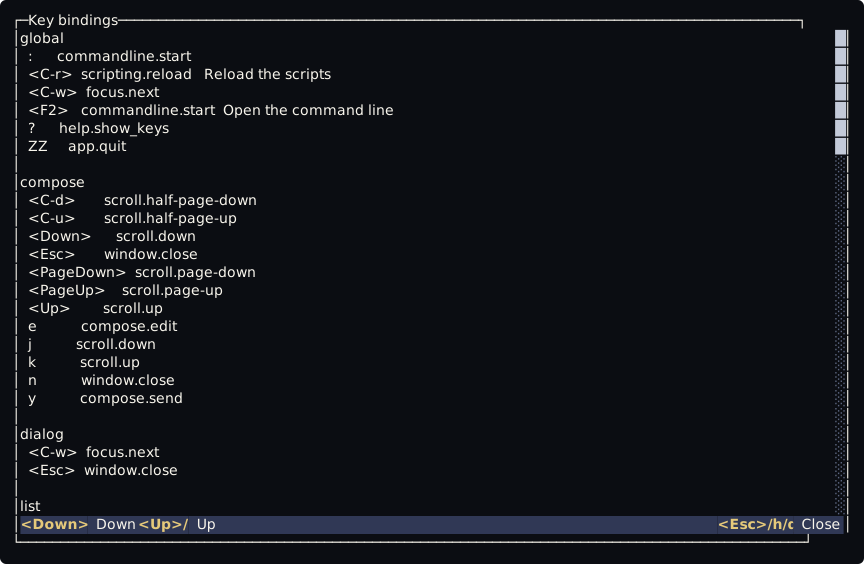
Binding the same key in the same context again replaces the old binding. keys.unbind(context, lhs) removes the binding in that context only: a binding of the same keys in global stays.
Functions
Section titled “Functions”A function bound to a key becomes a script command named keys.fn.1, keys.fn.2 and so on, and the key runs that command. It is in commands.list() and in the list that tcli scripts prints. The function gets the words of the command, and a count typed before the key is the first word, as a text. If it returns a string, tt shows it in the bottom bar. If it fails, the bar shows keys.fn.2: <error>, and a function that runs too long is stopped (see The sandbox and limits). Replacing or removing the binding removes its command.
The leader and the timeout
Section titled “The leader and the timeout”The leader and how long a sequence waits are in the [keys] table of config.toml, because Tilde needs the leader before the scripts run:
[keys]leader = "<Space>"timeout_ms = 1000The leader is one key and not a digit. timeout_ms is from 100 to 10000.
keybind.lua and reload
Section titled “keybind.lua and reload”keybind.lua holds the default bindings. Tilde writes it once, when it is missing, and never changes it, so it is yours. It runs before init.lua, so a keys.bind in init.lua replaces a default, and an empty keybind.lua means no default keys. A reload of the scripts drops every binding and runs both files again.
When keybind.lua fails, the error is reported with the source keybind.lua, the lines before the faulty one stay bound, and init.lua still runs. If the file cannot be run at all (a refused link, a directory with that name, a file that cannot be read), the built-in copy runs in its place. In both cases Tilde binds : in global, and Enter and Esc in writing, each one only when it is free, so you can still reach the command line.