
Mail and chat

Read mail over IMAP or from a Maildir, and send it over SMTP. Talk over XMPP and IRC. One tree of accounts and folders, with the unread messages of each folder.

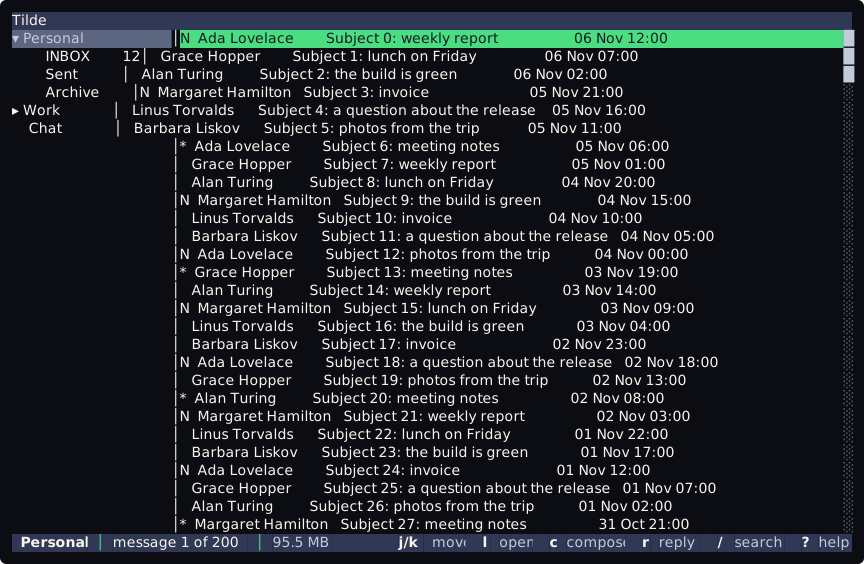
tt: the accounts and folders on the left, the messages on the right.On Debian and Ubuntu, add the apt repository and install the package:
sudo curl https://codeberg.org/api/packages/squidd/debian/repository.key -o /etc/apt/keyrings/forgejo-squidd.ascecho "deb [signed-by=/etc/apt/keyrings/forgejo-squidd.asc] https://codeberg.org/api/packages/squidd/debian stable main" | sudo tee /etc/apt/sources.list.d/tilde.listsudo apt update && sudo apt install tilde-alltilde-all installs both programs. tilde-cli is tcli alone and tilde-tui is tt alone. The page
Install on Debian and Ubuntu has the rest, and Install from an archive
covers the other systems. Start goes on from the install to a first config.toml, and the
tutorial walks through tt with made-up mail.
Mail and chat
Read mail over IMAP or from a Maildir, and send it over SMTP. Talk over XMPP and IRC. One tree of accounts and folders, with the unread messages of each folder.
Light
tt is the terminal interface and tcli the command line. Each is one self-contained file, and you can install one
or both. The configuration is one text file.
Configurable
Accounts live in config.toml. Keys, commands, timers and rules are Lua scripts that you own. OpenPGP goes through
your own gpg.