
Folders and the reader
This page explains the tree of accounts and folders on the left of tt, and the reader, the window that shows one message.
Try it
Section titled “Try it”tt --demoPress l or Enter on a message. The reader opens over the whole screen with the subject as its title. Press Ctrl-d to scroll, then q to go back to the list. Press Ctrl-w to move to the tree, h to close Personal, j to go down to Work, and l to open it.
The tree
Section titled “The tree”▾ Personal │N Ada Lovelace Subject 0: weekly report INBOX 12│ Grace Hopper Subject 1: lunch on Friday Sent │ Alan Turing Subject 2: the build is green Archive │N Margaret Hamilton Subject 3: invoice▸ Work │ Linus Torvalds Subject 4: a question about the release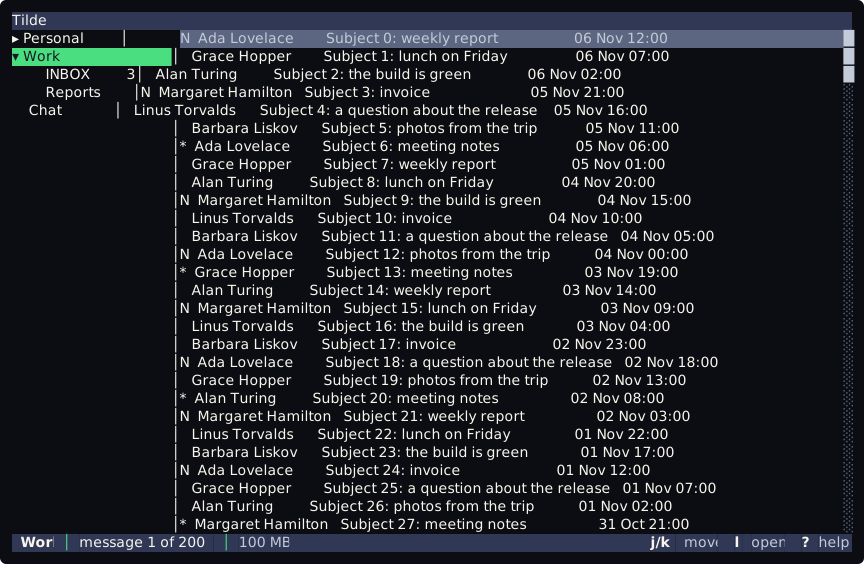
- The roots are the mail accounts of
config.toml, in the order of the file. Under each one are its folders.▾marks an open node and▸a closed one. - A folder is a child of the folder whose path is its own path up to the last
/:Work/Projectsis underWork. A folder whose parent is not there goes under the account. - The INBOX comes first, the others in the order of their names. The INBOX is found whatever its case, so
Inboxin a Maildir tree counts. - A folder with unread messages shows how many at the end of its row (
12). - Selecting an account shows the messages of its INBOX. Selecting a folder shows the messages of that folder.
The keys of the tree are on Keys and counts: j and k move, l and h open and close, Enter toggles, gg and G go to the first and the last row.
When the folders are read
Section titled “When the folders are read”The folders of an account are read in the background the first time you select the account, and the account opens when they come. An account that you never select is not asked for them, so an IMAP account does not connect for its folders until then. If the first read failed, the next selection tries again. If you move on to another account before the folders come, they are kept but the account does not open.
Folders that are created or deleted while tt runs do not show until the next start.
The list follows the mail
Section titled “The list follows the mail”- The list shows the newest 1000 messages of the folder. When the folder has more, the bottom bar says so:
message 3 of 1000 (1873 in the folder). Older messages cannot be reached fromttyet. - A message that arrives goes to the top, a message that is deleted goes away, and a change of flags updates its row, without a key. The unread numbers of the tree follow too.
- The selection stays on the same message when others come in or go away above it.
- This holds for IMAP and Maildir accounts, the two stores that
ttloads. - A folder that cannot be read says so in the bottom bar, by the type of the error:
Cannot read the folder 'Work' of 'Personal' (IOException)., with: it is not connected yet.in place of the full stop when that is the reason. The folder is read again when the account connects.
The reader
Section titled “The reader”l or Enter on a message opens it in the reader. The window covers the whole screen and has a frame with the subject as its title. It shows:
- the headers:
From,To,Cc,Date,Subject, and oneAttachmentline for each attachment, with its name, type and size; - a blank line;
- the body, which is the text part. A message with only an HTML part shows it as Markdown, after the line
(the text of this message comes from its HTML). A message with no text says(this message has no text).
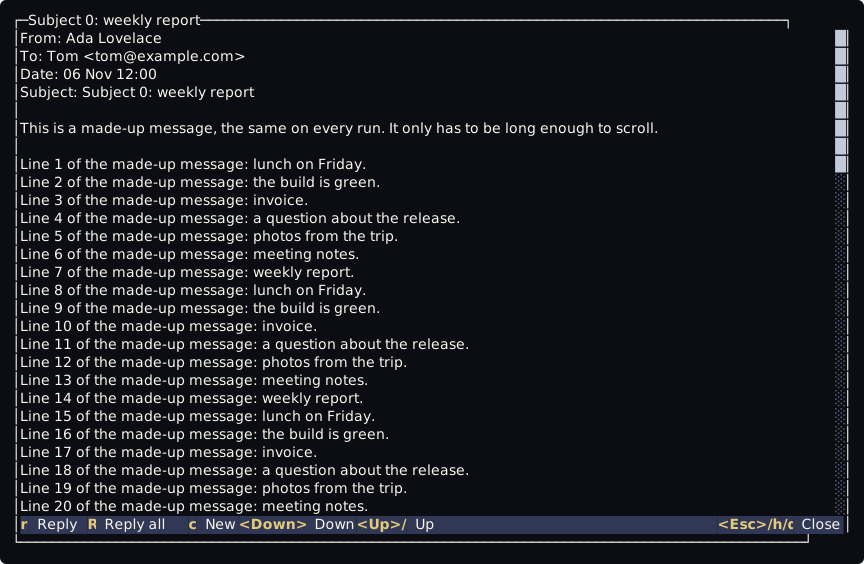
The window opens at once with Loading... and the message is read in the background, so a slow server does not stop the keys. A message that cannot be read says Cannot read the message (IOException)., by the type of the error, with : the account is not connected yet. in place of the full stop when that is the reason.
With [pgp] on, the reader decrypts an encrypted message and checks its signatures, and the Security line says what it found, for example Security: encrypted; signature good. A message that cannot be decrypted says The message could not be decrypted. and the keys it is encrypted to, with none of its text. With [pgp] off, a message with an armored OpenPGP block in its text (BEGIN PGP MESSAGE or BEGIN PGP SIGNED MESSAGE) shows it as the store has it, and the Security line says it was not checked. A PGP/MIME message is not marked. Setting it up is on OpenPGP.
Names and the subject are cut to one line and lose their control characters. No control character of the body reaches the terminal.
Keys of the reader
Section titled “Keys of the reader”The reader has its own context, reader, so the keys of the list do not work while it is open.
| Keys | What they do |
|---|---|
j, Down |
scroll one row down |
k, Up |
scroll one row up |
Ctrl-d, Ctrl-u |
half a page down and up |
Ctrl-f, PageDown |
a page down |
Ctrl-b, PageUp |
a page up |
gg, Home |
the start of the message |
G, End |
the end of the message |
h, q, Esc |
close the reader and go back to the list |
c |
write a new mail |
r, R |
answer the sender, answer everyone |
The last row inside the frame is a bar with the keys that work in the reader, in a fixed order, with Close at the right. It reads the keys from keybind.lua: a key that you rebind shows as you bound it, and a command that has no key in the reader is left out.
A count works here too: 5j scrolls five rows. A page is one row less than the window shows. Long lines wrap at the spaces.
A keybind.lua written before the reader existed has none of these keys. The README of tt lists the lines to add.
Not there yet
Section titled “Not there yet”Opening a message does not mark it as read, and the reader cannot save an attachment yet.