
What a bar returns
A bar function returns a table with left and right, each a list of items, and optionally bg, the colour of the whole row. return {} is an empty bar. This page says what an item may be and how it is checked. The functions that set a bar are on Bars.
Items, pieces and groups
Section titled “Items, pieces and groups”- An item is a bare string, a piece or a group.
- A piece is
{ text, fg = colour, bg = colour, bold = true }.textis a string and comes first;fg,bgandboldare optional, and a piece without them takes the colours of the row. A bare string is a piece with no style. - A group is a list of strings and pieces, such as
{ { "3 " }, { "unread", fg = "warning" } }. The bar keeps a group whole: when it is too narrow, the group is dropped or kept, never half of it. Items that are not groups are dropped one by one. - A table is a group when its first element is a table or it has more than one element. A table with one string first is a piece.
- A group holds strings and pieces, not other groups. The
fg,bgandboldthat you write on the group itself are ignored: style the pieces inside it.
Priority
Section titled “Priority”A piece or a group may carry priority, a whole number (0 when you leave it out): { "? help", priority = 3 }. A priority written on a piece inside a group is ignored: write it on the group. It says how long the item stays when the bar is too narrow.
When the bar is wider than the screen, the program drops whole items of right: the lowest priority first, and among equal priorities the last one first. The items that stay keep their order.
- Items of priority 3 or more are essential. Once only they are left,
leftis cut and ends with…to make room for them. - If even the essential items do not fit alone, they are dropped too, in the same order (the lowest priority first), until the rest fits.
- With no essential item,
leftis cut oncerightis empty.
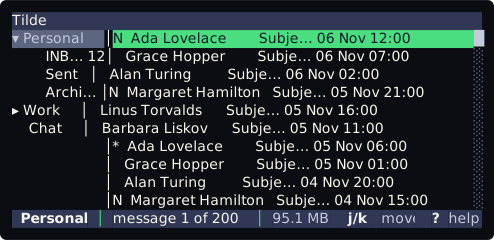
The default status line in a terminal of 56 columns drops the hints one by one and keeps j/k move and ? help:
Colours and text
Section titled “Colours and text”- A colour is a role of the theme (
muted,success,warning,error,border,accent), the name of an ANSI colour (red,brightblack) or#RRGGBB. A role follows the theme, so a bar that only uses roles looks right on every theme. The roles are on Theme roles. bgon the returned table fills the whole row. Without it the bar uses theBarrole of the theme. A role used as abg(orfg) gives its colour: the text colour of the role in the theme, sobg = "success"is the green thatsuccesshas as a text colour.- Bold is the only attribute.
- A text is cleaned for the terminal: a line break or another control character becomes a space and invisible characters are removed. It is cut at 200 characters, never inside an emoji.
- A side holds at most 64 pieces, counting the pieces inside groups.
Errors
Section titled “Errors”An unknown colour, a text that is not a string, a bold that is not true or false, a priority that is not a whole number, or a side that is not a list is an error that names the item, for example:
left item 2: fg: unknown colour 'mutd'; use a role of the theme (such as muted), a name like brightblack, or '#RRGGBB'What happens to a bar that fails is on Bars.