
Keys and counts
This page lists the keys of the main screen of tt: how to move in the list of messages and in the tree, how a count works, and how to quit.
Try it
Section titled “Try it”tt --demoPress j a few times, then 5j. The bottom bar goes from message 1 of 200 to message 6 of 200 and more. gg goes back to the first message. ZZ quits.
The focus
Section titled “The focus”The screen has two parts that take keys: the list of messages (the context list) and the tree of accounts and folders (the context sidebar). The list has the focus when tt starts. Ctrl-w gives the focus to the other part.
The selected row of the part that has the focus is black on cyan (the pictures of this site draw cyan in the mint green of the site, not in the cyan of your terminal). In the other part it is white on grey, so you can tell which one the keys move. A theme can change both colours: see Themes of tt.
The list of messages
Section titled “The list of messages”| Keys | What they do |
|---|---|
j, Down |
the next message |
k, Up |
the previous message |
gg, Home |
the first message |
G, End |
the last message |
Ctrl-d, PageDown |
half a page down |
Ctrl-u, PageUp |
half a page up |
l, Enter |
open the selected message in the reader |
/ |
search the list |
n, N |
the next and the previous match of the last search |
c |
write a new mail |
r, R |
answer the sender, answer everyone |
The reader is on Folders and the reader, the search on Search, and writing and answering on Write and send.
A row shows N for an unread message and * for a flagged one, then the sender, the subject and the date. The date is the time (12:00) for today, the day and month (06 Nov) for this year, and 2025-03-14 before.
The tree
Section titled “The tree”| Keys | What they do |
|---|---|
j, Down |
the next row |
k, Up |
the previous row |
l, Right |
open the account or the folder; on one that is open, go to its first child |
h, Left |
close the account or the folder; on one that is closed, go to its parent |
Enter |
open or close the account or the folder |
gg, G |
the first and the last row |
Space is not bound in the tree: it is the leader key. The tree is on Folders and the reader.
Keys that work everywhere
Section titled “Keys that work everywhere”| Keys | What they do |
|---|---|
Ctrl-w |
give the focus to the other part |
: |
open the command line |
ZZ |
quit |
Ctrl-c |
quit at once |
? |
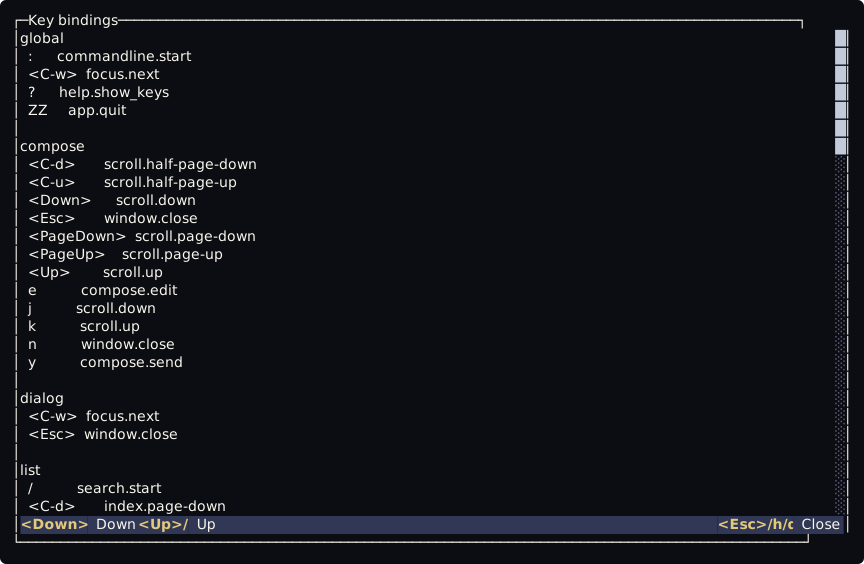
opens a window with every key binding, a block for each context, each line with the key, its command and its description when it has one; it scrolls and closes with the keys of the reader (help.show_keys) |
q never quits the main screen. :q and :quit do. Ctrl-c is not a binding, so it works even when keybind.lua is empty.
Counts
Section titled “Counts”A number typed before a key is a count, and it goes to the command as its first word. The digits 1 to 9 start a count, so no binding can start with them.
5jmoves five messages down,3kthree up.3Gand3gggo to the third message. Without a countGgoes to the last one andggto the first.2 Ctrl-dmoves two half pages.- In the tree,
5jmoves five rows. 5ngoes five matches on.
Sequences
Section titled “Sequences”gg and ZZ are sequences of two keys. After the first key Tilde waits for the next one, for one second by default. The wait and the leader key are in the [keys] table of config.toml:
[keys]leader = "<Space>"timeout_ms = 1000The mouse wheel
Section titled “The mouse wheel”The wheel moves the selection of the part that has the focus. tt asks the terminal to send Up and Down for the wheel, so it works when those keys are bound. Inside tmux or screen it depends on the outer terminal and on the mouse option of tmux. Clicks do nothing.
The ? key opens a window with every key, a block for each context:
Where the keys come from
Section titled “Where the keys come from”Every key on this page is a line of keybind.lua, in the scripts folder beside config.toml. Tilde writes the file once, when it is missing, and never changes it again. To change a key, see Change a key. The names of the commands are in tt commands and contexts.
A keybind.lua written by an older tt does not get the new keys by itself. The README of tt lists the lines to add by hand.